
Blumgi Rocket Unblocked — Play Free Online
More Driving and Sports games





Blumgi Rocket unblocked: play Blumgi Rocket online free right here in your browser — no download, no sign-up, works on a school Chromebook.
What is Blumgi Rocket?
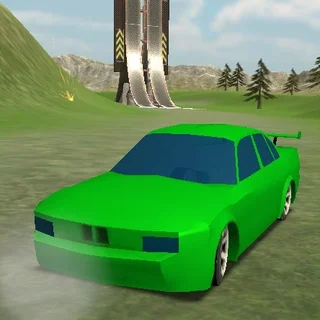
Blumgi Rocket is an arcade driving and platform game created by Blumgi in November 2021. Players take control of a high-powered vehicle equipped with rocket boosters to navigate colorful obstacle courses. The core loop centers on balancing throttle with rocket propulsion, timing massive jumps across deep ravines, and adjusting car rotation in mid-air to land cleanly. The game runs directly in modern desktop and mobile web browsers with no file download required.
Key features
- Rocket propulsion: Engage rear thrusters to gain explosive bursts of speed across steep slopes and wide gaps.
- Slow-motion flight: Firing thrusters triggers a slow-motion effect that grants precise control over vehicle orientation.
- Acrobatic stunts: Rotate mid-air to perform clean flips and position tires for safe landings.
- Vehicle customization: Unlock distinct car models and colorful skins by advancing through tracks.
- Varied terrain: Traverse hills, vertical climbs, loop-like curves, mountain crests, and enclosed tunnels.
- Immediate restarts: Fast respawn times let players test booster angles and refine stage routes without downtime.
How to play
- Press the drive keys to accelerate away from the starting gate.
- Hold the rocket booster button when approaching steep ramps or chasms to launch into the air.
- Use the slow-motion window while boosting to rotate the vehicle and align the wheels with the upcoming slope.
- Release the booster before entering low ceilings to prevent violent crashes against overhead barriers.
- Cross the finish line upright to complete the stage and unlock the next track.
Controls
| Action | Keyboard | Touch |
|---|---|---|
| Drive forward / reverse | Up arrow, Down arrow, W, or S | Touch drive controls |
| Rocket boost | Spacebar or D | Touch rocket icon |
Momentum and boost mechanics
Success in Blumgi Rocket relies on understanding how rocket propulsion interacts with track gravity. Tapping the rocket button produces a short hop useful for adjusting entry angles on small bumps. Holding the button sustains continuous thrust, propelling the vehicle across massive chasms at high velocity.
Whenever rocket thrusters fire, time slows down briefly. This slowdown provides crucial moments to rotate the car chassis. Landing flat on all wheels preserves accumulated momentum and allows immediate acceleration, whereas landing upside down crashes the vehicle and forces a stage restart.
Tips and strategy
- Feather the thruster: Firing continuous rockets inside enclosed tunnels often ricochets the car off ceilings; short taps maintain control.
- Rotate before touchdown: Use the slow-motion boost phase to ensure wheels face downward before contacting the road surface.
- Manage launch velocity: Approaching high mountain peaks at maximum speed can launch the car past the intended landing platform.
- Study course hazards: Observe moving barriers and sudden drops on your initial attempt to optimize rocket timing on subsequent runs.
Similar platform and arcade games
If you enjoy the fast-paced reflex challenges of Blumgi Rocket, several companion titles on Geometry Dash offer complementary physics and timing mechanics:
- Geometry Dash: A rhythm-based platformer where precise single-button inputs guide an icon through spike-filled obstacle courses.
- Electron Dash: A high-speed runner navigating endless neon tunnels while avoiding crumbling floor tiles.
- G-Switch: A reflex runner centered on flipping gravity upside down to run along ceilings and dodge hazards.
Developer and history
Blumgi Rocket was created by independent developer Blumgi and debuted in November 2021. The title showcases the studio's focus on responsive arcade physics, vibrant art direction, and quick restart loops that make mobile and browser platforming engaging.
Questions about Blumgi Rocket
Is Blumgi Rocket unblocked at school?
Blumgi Rocket runs in an ordinary browser tab from geometry-dash.me, with nothing to download or install, so it plays on most school Chromebooks and work computers. If a network filter blocks the site, only that network's administrator can change it.
Who developed Blumgi Rocket?
Blumgi Rocket was created by indie game developer Blumgi and was officially released in November 2021.
What are the primary controls in Blumgi Rocket?
You can steer and drive using the Up and Down arrow keys or W and S keys, and fire your boost with the Spacebar or D key.
Can I play Blumgi Rocket on mobile devices?
Yes, Blumgi Rocket runs directly in modern mobile web browsers with responsive touchscreen controls for driving and boosting.
How do you unlock new skins in Blumgi Rocket?
You unlock new vehicle models and colorful skins automatically as you clear obstacle tracks and complete stages.
More games
 Stickman Bike
 City Cab Rush
 Squid Dash
 Stick Rush
 Soccer Skills 2 World Cup
 Johnny Trigger Action Shooter
 Geometry Dash: Mr Dubstep
 Electron Dash
 Friday Night Funkin'
 Mophead Dash
 G-Switch 3
 Level Devil
 Big Tower Tiny Square 2
 Big Neon Tower vs Tiny Square
 G-Switch
 G-Switch 2
 Dino Run
 Stickman Hook
 Super Tunnel Rush
 OvO 2
 Slope Tunnel
 Doodle Jump
 Tunnel Rush
 Crossy Road
 House Of Hazards
 Skiing Fred
 Running Fred